CountryCodePickerCompose
CountryCodePickerCompose
A Modern Country Code Picker for Jetpack Compose






[!NOTE] Full tutorial on this library on YouTube. You can check it out here
🎉 What’s New in v0.2
Version 0.2 brings major UI/UX improvements along with critical bug fixes and enhanced stability:
🎨 Material 3 Design Overhaul
- ✅ Complete Material 3 Compliance: Proper elevation (6dp dialogs, 1dp bottom sheets), 28dp rounded corners, semantic color tokens
- ✅ Modern Typography: Full Material 3 typography scale with proper line heights and letter spacing
- ✅ Enhanced Visual Feedback: Selected country highlighting with check icons and background tinting
- ✅ Improved Search: Material 3 OutlinedTextField with search result count and better spacing
- ✅ Bottom Sheet Enhancements: Drag handles, optimized height, proper keyboard handling
- ✅ Empty States: Beautiful empty state UI when no search results found
- ✅ Better Spacing: Consistent 8dp grid system, 56dp minimum touch targets, proper padding throughout
🐛 Critical Bug Fixes
- ✅ Fixed Critical Bugs: All GitHub issues (#1, #2, #3) resolved
- ✅ Keyboard Handling: Bottom sheet content no longer hidden by keyboard
- ✅ VisualTransformation Crashes: Completely rewrote offset mapping logic with bounds checking
- ✅ API Compatibility: Works with Compose BOM 2024.12.01+ and Material 3 latest versions
🆙 Updated Dependencies
- ✅ Kotlin 2.1.0: Latest stable Kotlin with improved Compose compiler
- ✅ Compose BOM 2024.12.01: Latest Jetpack Compose libraries
- ✅ Target SDK 35: Updated for Android 15 support
- ✅ 19 Language Support: Country names available in 19 languages
📱 Enhanced Sample App
- ✅ 7 Comprehensive Examples: From basic usage to advanced validation
- ✅ Dark/Light Mode Toggle: Real-time theme switching
- ✅ 15+ Usage Patterns: Complete showcase of library features
- ✅ Interactive Demos: Phone number search, validation, and formatting examples
🛡️ Better Development Experience
- ✅ ProGuard Rules: Automatic R8/ProGuard support for release builds
- ✅ Comprehensive KDoc: Complete API documentation with usage examples
- ✅ Input Validation: Clear error messages for invalid parameters
- ✅ 38 Unit Tests: 100% passing test coverage with CI/CD pipeline
Migration from 0.1.x: No breaking changes! Just update your dependencies. See the Migration Guide below.
Table of Contents
- Purpose
- Features
- Demo
- Prerequisites
- Dependency
- Usage
- Customization
- Utility Functions
- Migration from 0.1 to 0.2
- Sample App Examples
- Notes
- Contribute
- License
Purpose
In various apps, we need to use a country code picker. There are several libraries available for this purpose. In XML we have a CCP created by hbb20, which is great. In Jetpack Compose there are few libraries but they lack some features and updates. So, I created this library to use in Jetpack Compose.
CountryCodePickerCompose is:
- ✨ Modern: Built with Jetpack Compose and Material 3 design
- 🎨 Beautiful: Follows Material Design 3 guidelines with proper elevation, spacing, and animations
- 🔧 Customizable: Highly configurable with multiple usage patterns
- 🌍 International: 19 language translations for country names
- 📱 Flexible: 4 different usage modes (View, TextField, Dialog, BottomSheet)
- 🛡️ Reliable: Comprehensive testing, proper error handling, production-ready
Features
- Minimal & Lightweight: Optimized for performance with efficient code
- Emoji Flags: No image assets needed, uses native emoji flags
- 4 Usage Modes:
- As a View (Full Screen, Compact, or Attached to TextField)
- As a TextField (Integrated with OutlinedTextField)
- As a Dialog (Picker dialog overlay)
- As a BottomSheet (Material 3 bottom sheet)
- Automatic Detection: Detects user’s country based on device settings
- Phone Validation: Built-in phone number validation using libphonenumber
- Visual Transformation: Automatic phone number formatting as you type
- Advanced Search: Search by country name, code, or phone number (e.g., “+12125551234”)
- Material 3 Design: Complete Material You design system compliance
- 19 Languages: Country names available in multiple languages
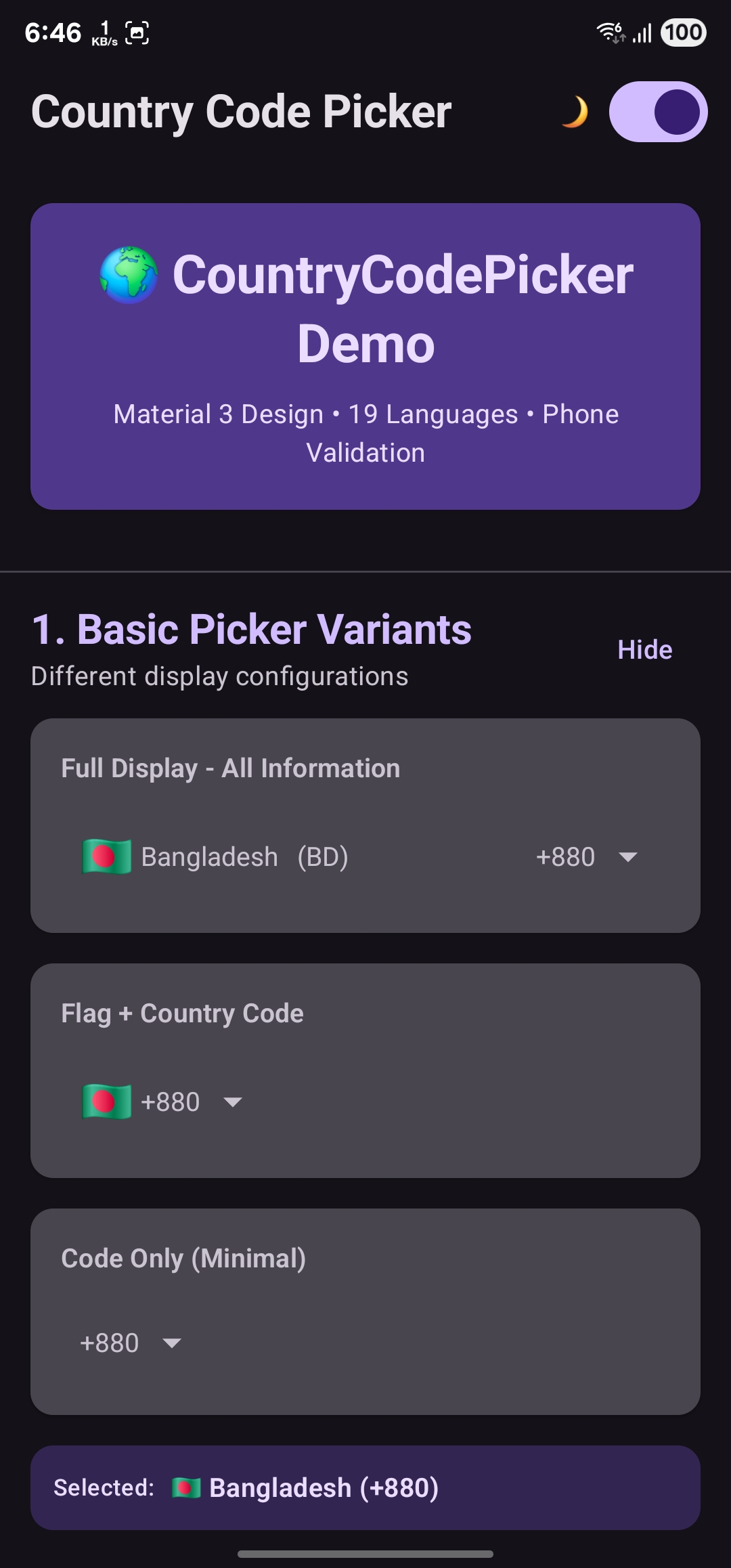
- Dark Mode: Full dark mode support with proper contrast
- Highly Customizable: Extensive customization options for all components
Demo
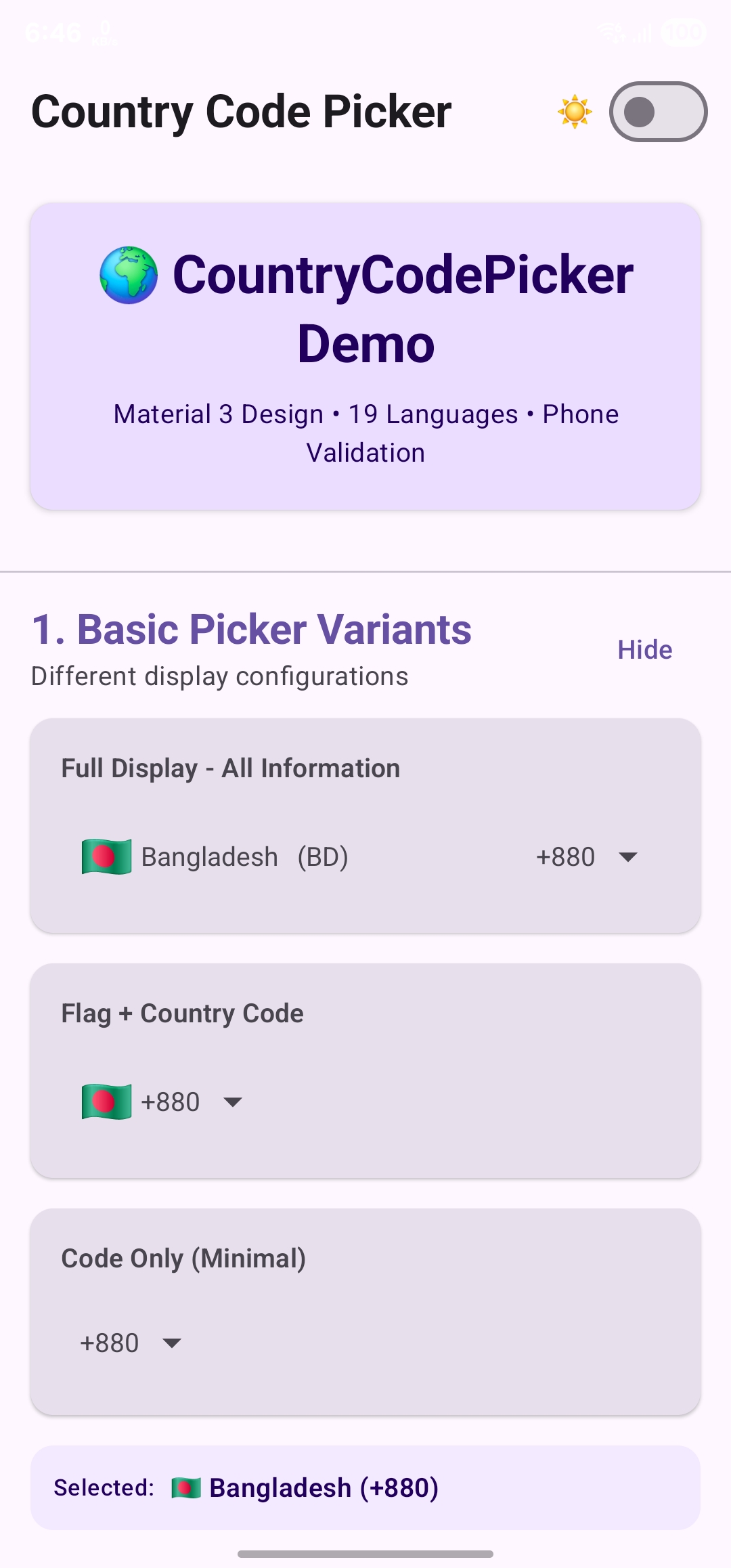
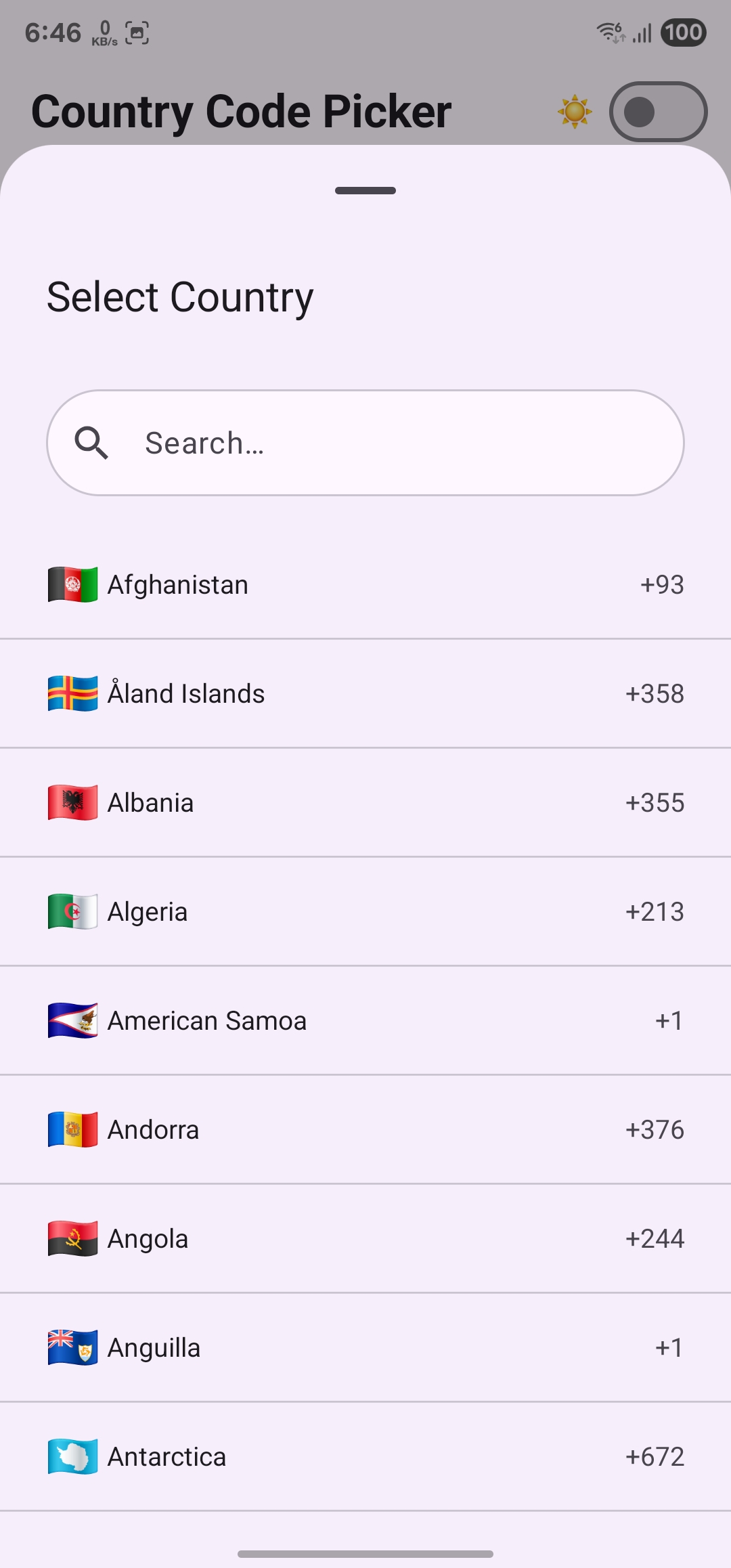
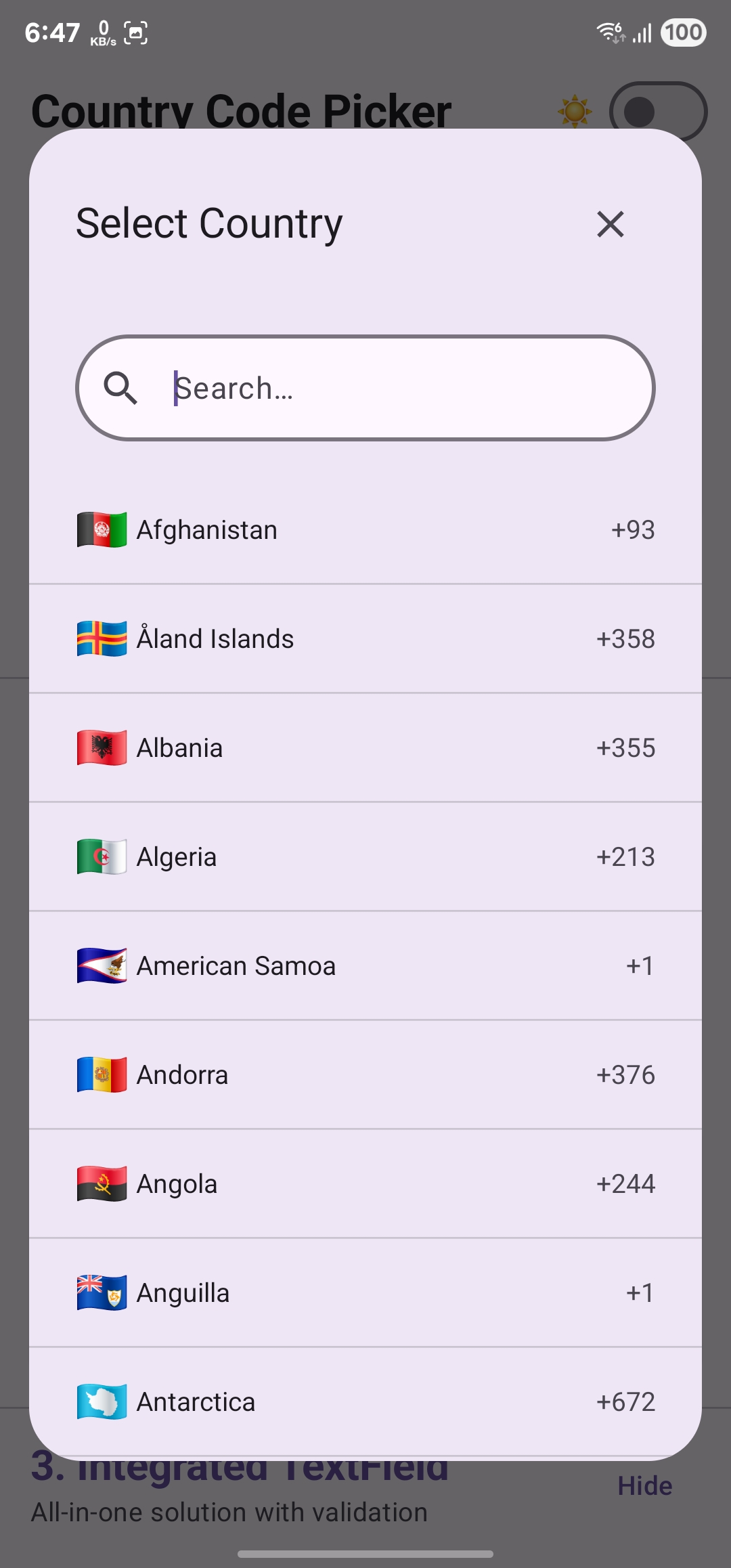
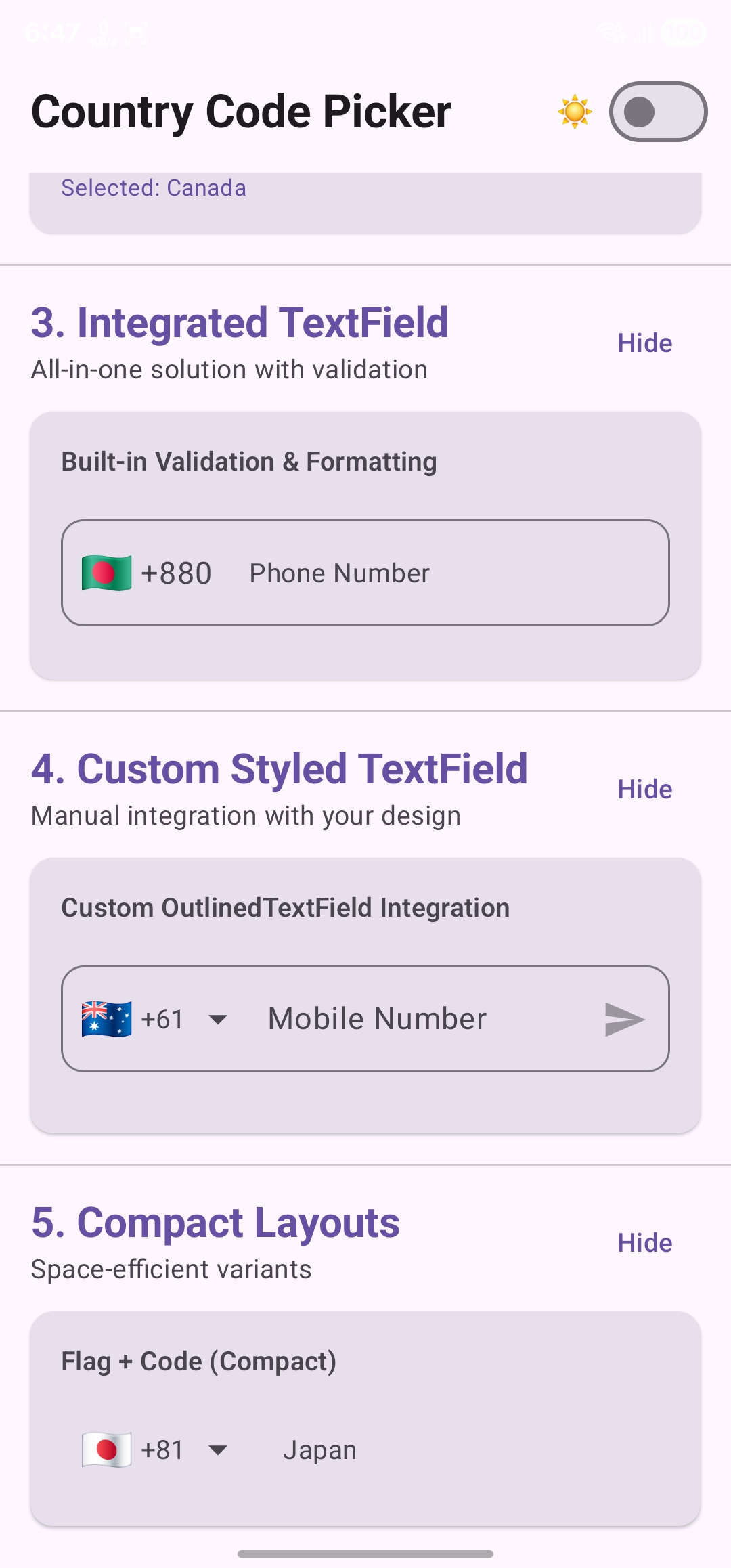
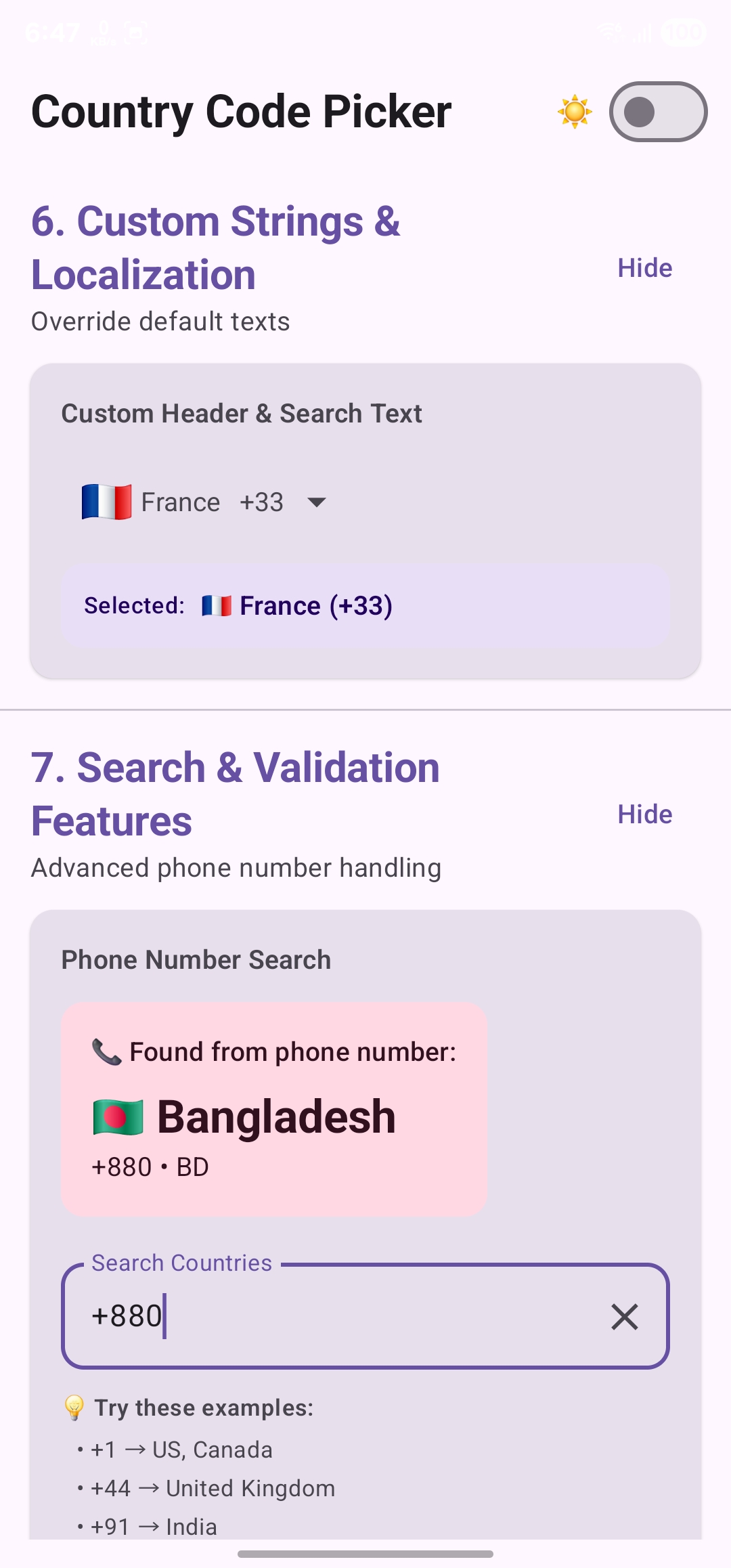
| Different Use Cases | Country Picker Dialog | Picker Bottom Sheet |
|---|---|---|
 |
 |
 |
 |
 |
 |
You can download the test apk to try out all features - Download APK
Prerequisites
Kotlin DSL
dependencyResolutionManagement {
    repositoriesMode.set(RepositoriesMode.FAIL_ON_PROJECT_REPOS)
    repositories {
        google()
        mavenCentral()
        maven {
            url = uri("https://jitpack.io")
        }
    }
}
Dependency
Add this to your module’s build.gradle.kts file (latest version ):
Kotlin DSL
dependencies {
    implementation("com.github.ahmmedrejowan:CountryCodePickerCompose:0.2")
}
Usage
There are 4 different ways to use this library:
- CountryCodePicker - Regular composable (can be used anywhere, attached to TextField)
- CountryCodePickerTextField - All-in-one TextField with integrated picker
- CountryPickerDialog - Standalone picker dialog
- CountryPickerBottomSheet - Material 3 bottom sheet picker
CountryCodePicker
A flexible composable that can be used in multiple ways - as a standalone picker, attached to a TextField, or in custom layouts.
Basic Usage:
var selectedCountry by remember { mutableStateOf(Country.UnitedStates) }

CountryCodePicker(
    selectedCountry = selectedCountry,
    onCountrySelected = { selectedCountry = it },
    modifier = Modifier.fillMaxWidth()
)
Compact Mode (Flag + Code Only):
CountryCodePicker(
    selectedCountry = selectedCountry,
    onCountrySelected = { selectedCountry = it },
    viewCustomization = ViewCustomization(
        showFlag = true,
        showCountryIso = false,
        showCountryName = false,
        showCountryCode = true,
        showArrow = true
    ),
    showSheet = true  // Use bottom sheet (false for dialog)
)
Key Parameters:
selectedCountry: Country- Currently selected countryonCountrySelected: (Country) -> Unit- Callback when country is selectedshowSheet: Boolean- true for bottom sheet, false for dialog (default: false)viewCustomization: ViewCustomization- Customize the picker button appearancepickerCustomization: PickerCustomization- Customize the picker dialog/sheet
CountryCodePickerTextField
An all-in-one solution with integrated TextField, validation, and formatting.
Basic Usage:
var phoneNumber by remember { mutableStateOf("") }
var selectedCountry by remember { mutableStateOf(Country.UnitedStates) }

CountryCodePickerTextField(
    number = phoneNumber,
    onValueChange = { country, number, isValid ->
        selectedCountry = country
        phoneNumber = number
    },
    selectedCountry = selectedCountry,
    modifier = Modifier.fillMaxWidth(),
    label = { Text("Phone Number") },
    showError = true  // Show validation errors
)
With Custom Styling:
CountryCodePickerTextField(
    number = phoneNumber,
    onValueChange = { country, number, isValid ->
        selectedCountry = country
        phoneNumber = number
    },
    selectedCountry = selectedCountry,
    modifier = Modifier.fillMaxWidth(),
    shape = RoundedCornerShape(16.dp),
    textStyle = MaterialTheme.typography.bodyLarge,
    label = { Text("Enter Phone Number") },
    trailingIcon = {
        if (phoneNumber.isNotEmpty()) {
            IconButton(onClick = { phoneNumber = "" }) {
                Icon(Icons.Default.Clear, "Clear")
            }
        }
    },
    showError = true,
    showSheet = true
)
Key Features:
- Automatic phone number formatting as you type
- Real-time validation with visual feedback
- Integrated country picker (dialog or bottom sheet)
- Customizable styling and icons
CountryPickerDialog
A standalone picker dialog for manual integration.
Usage:
var selectedCountry by remember { mutableStateOf(Country.UnitedStates) }
var isDialogOpen by remember { mutableStateOf(false) }

// Your UI element to trigger the dialog
Button(onClick = { isDialogOpen = true }) {
    Text("Select Country")
}

// Dialog
if (isDialogOpen) {
    CountryPickerDialog(
        onDismissRequest = { isDialogOpen = false },
        onItemClicked = { country ->
            selectedCountry = country
            isDialogOpen = false
        },
        selectedCountry = selectedCountry,
        pickerCustomization = PickerCustomization(
            showCountryCode = true,
            showFlag = true
        )
    )
}
CountryPickerBottomSheet
A Material 3 bottom sheet picker with proper drag handle and keyboard support.
Usage:
var selectedCountry by remember { mutableStateOf(Country.UnitedStates) }
var isSheetOpen by remember { mutableStateOf(false) }

// Your UI element to trigger the sheet
Button(onClick = { isSheetOpen = true }) {
    Text("Select Country")
}

// Bottom Sheet
if (isSheetOpen) {
    CountryPickerBottomSheet(
        onDismissRequest = { isSheetOpen = false },
        onItemClicked = { country ->
            selectedCountry = country
            isSheetOpen = false
        },
        selectedCountry = selectedCountry,
        pickerCustomization = PickerCustomization(
            showCountryCode = true,
            showFlag = true
        )
    )
}
Features:
- Material 3 drag handle
- Proper keyboard handling (content stays visible)
- Smooth animations
- Optimized height (92% of screen)
Customization
ViewCustomization
Customize how the picker button/view appears:
data class ViewCustomization(
    var showFlag: Boolean = true,          // Show country flag emoji
    var showCountryIso: Boolean = false,   // Show country ISO code (e.g., "US")
    var showCountryName: Boolean = false,  // Show country name
    var showCountryCode: Boolean = true,   // Show country code (e.g., "+1")
    var showArrow: Boolean = true,         // Show dropdown arrow
    var clipToFull: Boolean = false        // Clip content to prevent overflow
)
Examples:
// Full display: Flag + Name + (ISO) + Code
ViewCustomization(
    showFlag = true,
    showCountryIso = true,
    showCountryName = true,
    showCountryCode = true
)

// Compact: Flag + Code only
ViewCustomization(
    showFlag = true,
    showCountryCode = true,
    showCountryName = false,
    showCountryIso = false
)

// Minimal: Code only
ViewCustomization(
    showFlag = false,
    showCountryCode = true,
    showArrow = true
)
PickerCustomization
Customize the picker dialog/bottom sheet appearance:
data class PickerCustomization(
    var itemPadding: Int = 10,                           // Padding for list items
    var showSearchClearIcon: Boolean = true,             // Show clear button in search
    var showCountryCode: Boolean = true,                 // Show codes in list
    var showFlag: Boolean = true,                        // Show flags in list
    var showCountryIso: Boolean = false,                 // Show ISO codes in list

    // Custom text strings (can use string resources or direct strings)
    var headerTitle: Int = R.string.select_country,      // Dialog/sheet header
    var headerTitleText: String? = null,                 // Or use direct string
    var searchHint: Int = R.string.search_country,       // Search field hint
    var searchHintText: String? = null                   // Or use direct string
)
Examples:
// Custom strings for localization
PickerCustomization(
    headerTitleText = "Sélectionner un pays",  // French
    searchHintText = "Rechercher",
    showCountryCode = true
)

// Minimal picker with codes only
PickerCustomization(
    showFlag = false,
    showCountryCode = true,
    showCountryIso = true
)
Utility Functions
Automatic Country Detection
Automatically detect the user’s country based on their device settings:
var selectedCountry by remember { mutableStateOf(Country.UnitedStates) }

// Detect country on first composition
LaunchedEffect(Unit) {
    CCPUtils.getCountryAutomatically(context = LocalContext.current)?.let {
        selectedCountry = it
    }
}

// Or use in non-preview mode
if (!LocalInspectionMode.current) {
    CCPUtils.getCountryAutomatically(context = LocalContext.current)?.let {
        selectedCountry = it
    }
}
How it works:
- First tries to detect from SIM card (requires READ_PHONE_STATE permission)
- Falls back to device locale if SIM detection fails
- Returns null if country cannot be determined
Phone Number Validation
Validate phone numbers using Google’s libphonenumber library:
val context = LocalContext.current
val validator = remember(context) { CCPValidator(context = context) }

var phoneNumber by remember { mutableStateOf("") }
var isValid by remember { mutableStateOf(false) }

OutlinedTextField(
    value = phoneNumber,
    onValueChange = { newNumber ->
        phoneNumber = newNumber
        isValid = validator(
            number = newNumber,
            countryCode = selectedCountry.countryCode
        )
    },
    isError = phoneNumber.isNotEmpty() && !isValid,
    label = { Text(if (isValid) "Valid ✓" else "Phone Number") }
)
Features:
- Real-time validation as user types
- Country-specific number format checking
- Returns true for valid numbers, false otherwise
Visual Transformation
Automatically format phone numbers as the user types:
OutlinedTextField(
    value = phoneNumber,
    onValueChange = { phoneNumber = it },
    visualTransformation = CCPTransformer(
        context = LocalContext.current,
        countryIso = selectedCountry.countryIso
    ),
    keyboardOptions = KeyboardOptions(keyboardType = KeyboardType.Phone)
)
What it does:
- Formats numbers according to country-specific patterns
- Updates automatically when country changes
- Preserves underlying raw value
- Works with paste operations
Note: This is already integrated in CountryCodePickerTextField.
Phone Number Search
Find countries by phone number:
val context = LocalContext.current
var searchQuery by remember { mutableStateOf("") }
var foundCountry by remember { mutableStateOf<Country?>(null) }

OutlinedTextField(
    value = searchQuery,
    onValueChange = { query ->
        searchQuery = query
        // Find country from phone number
        foundCountry = if (query.startsWith("+")) {
            Country.findCountry(query, context)
        } else null
    },
    label = { Text("Enter phone number (e.g., +12125551234)") }
)

// Display result
foundCountry?.let { country ->
    Text("Country: ${country.countryName} (${country.countryCode})")
}
Features:
- Extracts country from phone number
- Works with full international numbers
- Returns null if country cannot be determined
📦 Migration from 0.1 to 0.2
Good news! Version 0.2 has NO breaking changes. Your existing code will continue to work without modifications.
What You Need to Update
1. Update Dependencies:
// In your build.gradle.kts (Project level)
plugins {
    id("org.jetbrains.kotlin.plugin.compose") version "2.1.0" apply false
}

// In your build.gradle.kts (Module level)
plugins {
    id("org.jetbrains.kotlin.plugin.compose")
}

dependencies {
    // Update the library version
    implementation("com.github.ahmmedrejowan:CountryCodePickerCompose:0.2")
}
2. Update Kotlin and Compose (Recommended):
// In your gradle/libs.versions.toml or build.gradle.kts
kotlin = "2.1.0"                      // Updated from 1.9.0
composeBom = "2024.12.01"             // Updated from 2024.05.00
3. Remove Old Compiler Options (if you have them):
// REMOVE this from your build.gradle.kts:
android {
    composeOptions {
        kotlinCompilerExtensionVersion = "1.5.x"  // Not needed with Kotlin 2.0+
    }
}
What Works Automatically
✅ All your existing code - No API changes required ✅ Your custom styles - ViewCustomization and PickerCustomization remain the same ✅ Your callbacks - onCountrySelected, onValueChange work exactly as before ✅ ProGuard/R8 - Rules are now automatically applied via consumer-rules.pro
What’s New (Optional to Use)
🆕 Material 3 Improvements - Your UI automatically looks better with no changes
🆕 Better keyboard handling - Bottom sheets work better with keyboard (automatic)
🆕 19 Languages - Country names support multiple languages (automatic)
🆕 Phone number search - Use Country.findCountry(phoneNumber) to find country from phone number
🆕 Enhanced validation - Better error handling (automatic)
Testing Your Migration
- Update dependencies
- Clean and rebuild:
./gradlew clean build - Test your app - everything should work as before
- Optional: Update to use new features if desired
Need Help?
If you encounter any issues during migration:
- Check the Changelog for detailed changes
- See the Sample App for updated examples
- Open an issue on GitHub
Sample App Examples
The included sample app demonstrates 7 comprehensive usage patterns with 15+ examples:
- Basic Picker Variants - Full display, compact, minimal configurations
- Dialog vs Bottom Sheet - Compare both UI patterns
- Integrated TextField - All-in-one solution with validation
- Custom Styled TextField - Manual integration with custom design
- Compact Layouts - Space-efficient variants
- Custom Strings & Localization - Override default texts
- Search & Validation Features - Advanced phone number search and validation
Features:
- 🌓 Dark/Light mode toggle
- 🎨 Clean Material 3 design
- 📱 Real-time validation
- 🔍 Interactive search demos
- 📝 Copy-paste ready code
Notes
- The library follows Material Design 3 guidelines for consistent, modern UI
- 19 languages are supported for country names (automatic based on device locale)
- Emoji flags are used instead of image assets for better performance
- The library uses libphonenumber for accurate phone number validation
- ProGuard/R8 rules are included automatically - no manual configuration needed
- Keyboard handling in bottom sheet is optimized to prevent content from being hidden
- All components support both light and dark themes
- The library is tested with 38 unit tests (100% passing)
Known Limitations
- Emoji flags may render differently across devices (depends on OS emoji support)
- Some older Android versions may not support all emoji flags properly
- Phone number validation requires Google Play Services on device
Inspiration and Credit
- Inspired by CountryCodePickerProject by hbb20
- Inspired by jetpack_compose_country_code_picker by togisoft
- Inspired by jetpack_compose_country_code_picker_emoji by jump-sdk
- Credit to libphonenumber-android by MichaelRocks
- Special thanks to @Sparks1998 for the 19-language localization contribution
Contribute
Please fork this repository and contribute back using pull requests.
Ways to contribute:
- 🐛 Report bugs and issues
- 💡 Suggest new features
- 🌍 Add translations for more languages
- 📝 Improve documentation
- ✨ Submit code improvements
Before contributing:
- Check existing issues and pull requests
- Run the test suite:
./gradlew test - Follow the existing code style
- Add tests for new features
If this project helps you, give it a ⭐ Star on GitHub!
License
Copyright 2024 ahmmedrejowan

Licensed under the Apache License, Version 2.0 (the "License");
you may not use this file except in compliance with the License.
You may obtain a copy of the License at

 http://www.apache.org/licenses/LICENSE-2.0

Unless required by applicable law or agreed to in writing, software
distributed under the License is distributed on an "AS IS" BASIS,
WITHOUT WARRANTIES OR CONDITIONS OF ANY KIND, either express or implied.
See the License for the specific language governing permissions and
limitations under the License.