

NumberConverter app
Offline number base converter and mixed-base calculator for Android, with step-by-step explanations. Binary, octal, decimal and hexadecimal. Jetpack Compose, Material 3
github.com/ahmmedrejowan/NumberConverter
About

Number System Converter & Calculator for Android
An offline, privacy-focused converter for Binary, Octal, Decimal, and Hexadecimal — built with Jetpack Compose and Material 3. Every conversion and calculation comes with a step-by-step explanation of how the answer was reached.
Features
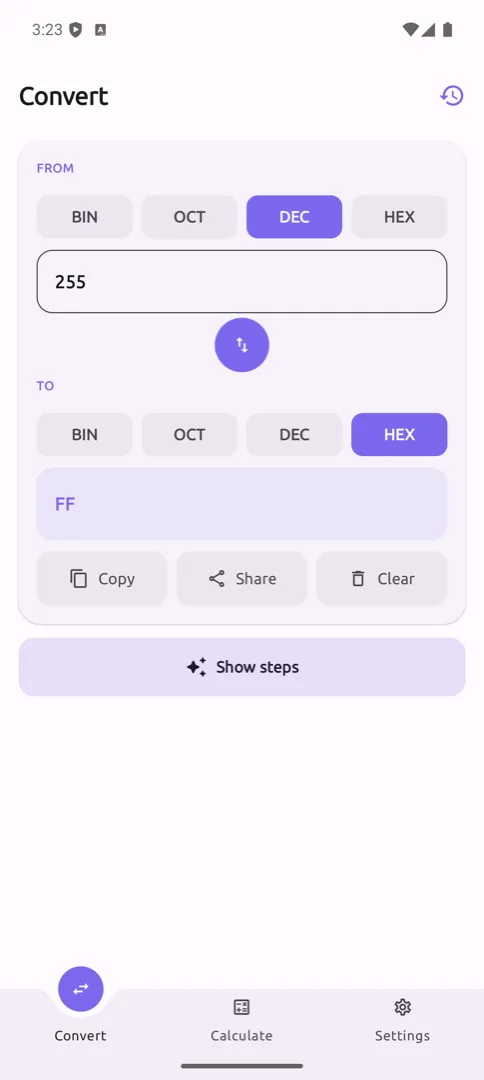
- Convert Any Base — Binary, Octal, Decimal, and Hexadecimal in all 12 directions
- Fractional Support — converts values with a fractional part, not just integers
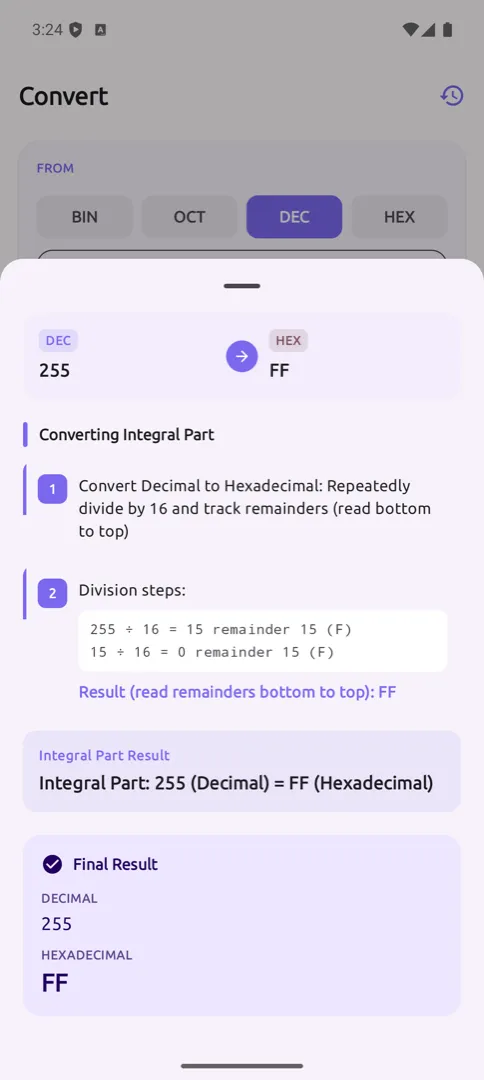
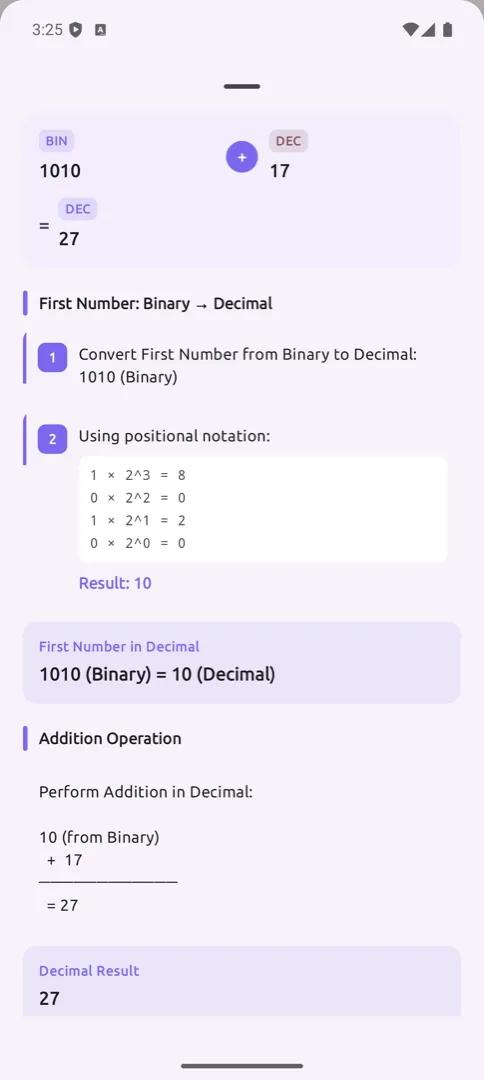
- Step-by-Step Explanations — every conversion opens a sheet showing positional notation, the division method, remainders, and the final result
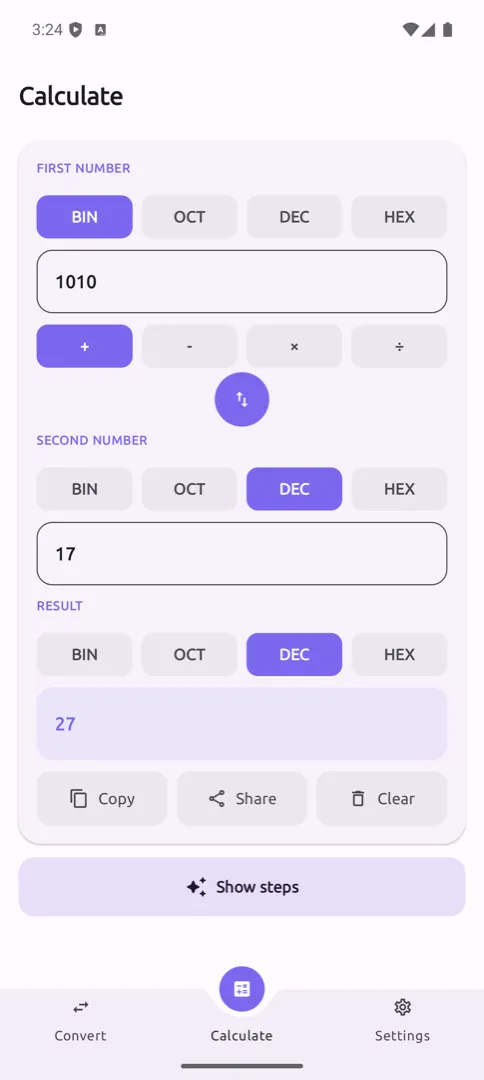
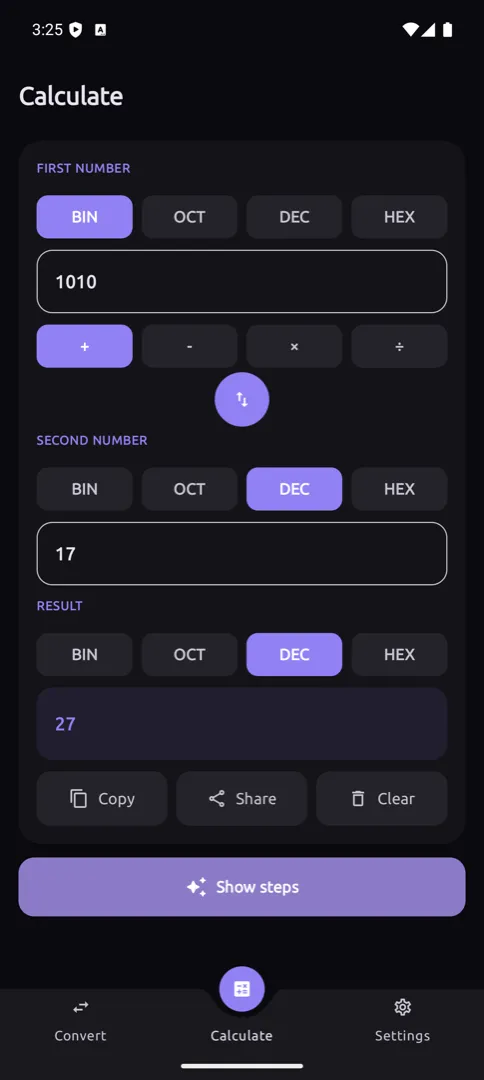
- Mixed-Base Calculator — add, subtract, multiply, and divide across different bases (e.g.
1010₂ + 17₁₀), with the result in any base you pick - Calculation Breakdowns — the calculator explains operand conversion, the arithmetic, and the conversion back
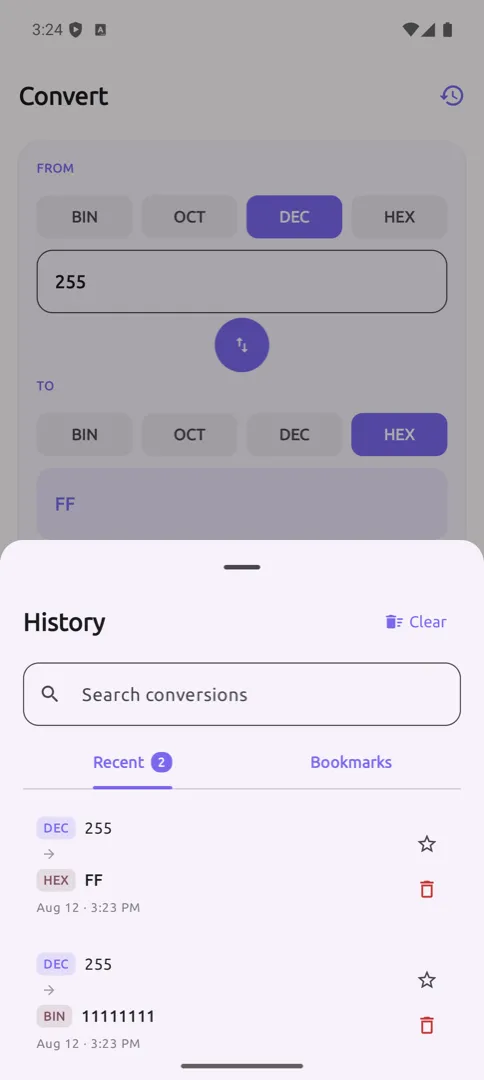
- History & Bookmarks — every conversion is saved, searchable, and can be starred for later
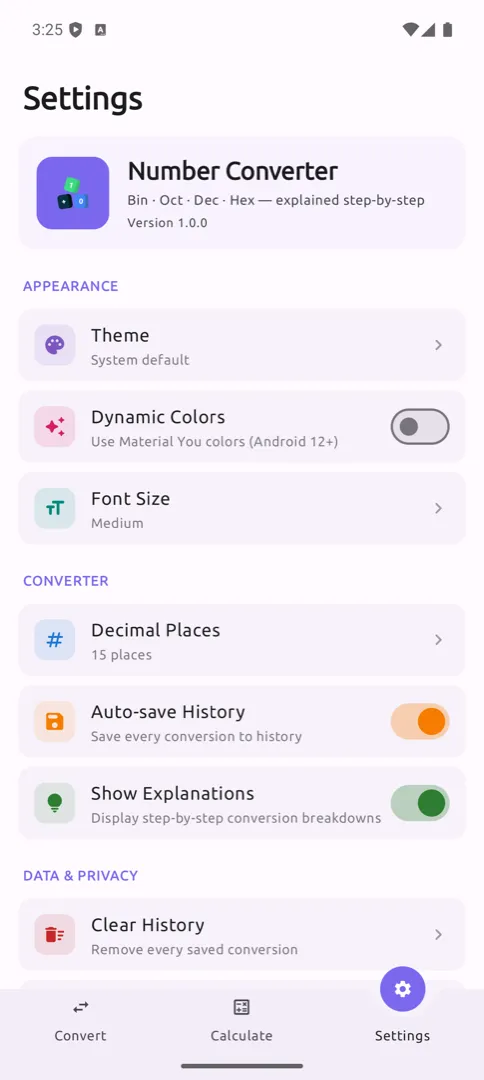
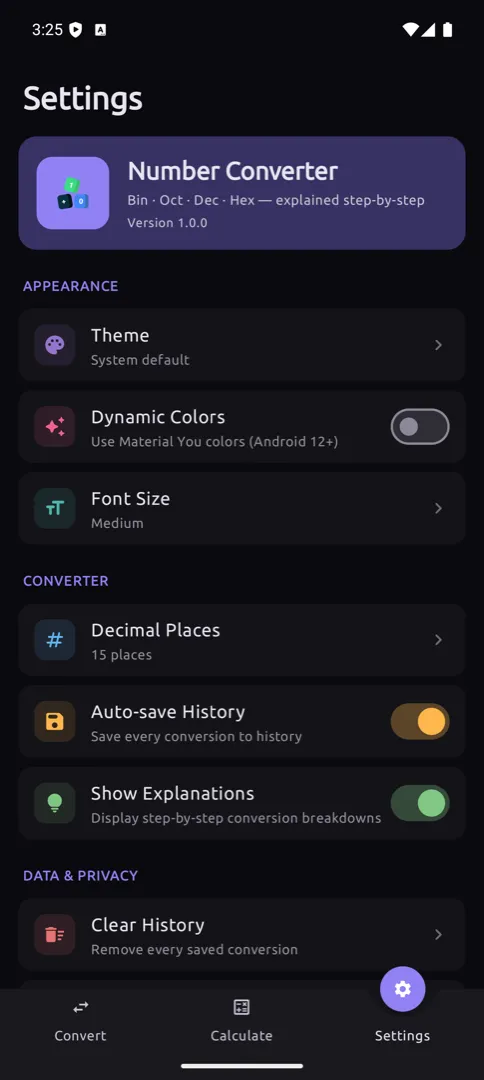
- Material 3 Design — dark mode, optional dynamic colors, and adjustable font size
- 100% Offline — no permissions, no network, no ads, no tracking, no analytics
Download
You can download the latest APK from here

Check out the releases section for more details.
Screenshots
| Shots | Shots | Shots |
|---|---|---|
 |
 |
 |
 |
 |
 |
 |
 |
 |
Architecture
Number Converter follows Clean Architecture principles with the MVVM pattern:
app/src/main/java/com/rejowan/numberconverter/
├── data/                      # Data layer
│   ├── converter/             # BaseConverter + per-base converters, explanation generators
│   ├── local/
│   │   ├── database/          # Room database, DAO, entities
│   │   └── datastore/         # PreferencesManager
│   └── repository/            # Repository implementations
│
├── domain/                    # Domain layer
│   ├── model/                 # NumberBase, Operation, Explanation, HistoryItem
│   ├── repository/            # Repository interfaces
│   └── usecase/               # converter / calculator / history / settings
│
├── presentation/              # Presentation layer (UI)
│   ├── common/                # Shared components, theme, util
│   ├── converter/             # Converter screen, state, components
│   ├── calculator/            # Calculator screen, state, components
│   ├── settings/              # Settings screen, state, components
│   ├── onboarding/            # First-run onboarding
│   ├── home/                  # Bottom-nav host
│   ├── navigation/            # Parent + bottom-nav graphs
│   └── main/                  # MainActivity
│
├── di/                        # Koin dependency injection
└── util/                      # Utilities
Tech Stack
- UI Framework: Jetpack Compose (100% Compose UI)
- Language: Kotlin (100%)
- Architecture: MVVM + Clean Architecture
- Dependency Injection: Koin
- Database: Room (KSP)
- Preferences: DataStore
- Async: Kotlin Coroutines + Flow
- Navigation: Jetpack Navigation Compose (type-safe routes via Kotlin Serialization)
- Design: Material 3 with dynamic color support
- Precision:
BigInteger/BigDecimalfor arbitrary-precision conversion - Testing: JUnit, MockK, Turbine
Requirements
- Minimum SDK: API 24 (Android 7.0 Nougat)
- Target SDK: API 37
- Compile SDK: API 37
- Gradle: 9.7.0
- AGP: 9.2.1
- Kotlin: 2.4.10
- Java: 17
Permissions
None. The app declares no permissions at all — not even INTERNET.
Note: This app does not collect or transmit any user data.
Build & Run
To build and run the project, follow these steps:
- Clone the repository:
bash
git clone https://github.com/ahmmedrejowan/NumberConverter.git - Open the project in Android Studio.
- Sync the project with Gradle files.
- Connect your Android device or start an emulator.
- Click on the "Run" button in Android Studio to build and run the app.
Release Builds
Release signing reads from keystore.properties in the project root (gitignored),
falling back to the KEYSTORE_FILE, KEYSTORE_PASSWORD, KEY_ALIAS, and
KEY_PASSWORD environment variables used by CI:
storeFile=release.keystore
storePassword=...
keyAlias=...
keyPassword=...
Without either, assembleRelease still builds — it just produces an unsigned APK.
Testing
# Run unit tests
./gradlew test

# Run instrumented tests
./gradlew connectedAndroidTest
Conversion and calculation logic is covered by unit tests across BaseConverter,
the explanation generators, the repositories, the use cases, and both ViewModels.
Contributing
Contributions are welcome! Please read CONTRIBUTING.md for guidelines.
Quick Start
- Fork the repository
- Create your feature branch (
git checkout -b feature/AmazingFeature) - Commit your changes (
git commit -m 'Add some AmazingFeature') - Push to the branch (
git push origin feature/AmazingFeature) - Open a Pull Request
License
Copyright (C) 2026 K M Rejowan Ahmmed

This program is free software: you can redistribute it and/or modify
it under the terms of the GNU General Public License as published by
the Free Software Foundation, either version 3 of the License, or
(at your option) any later version.

This program is distributed in the hope that it will be useful,
but WITHOUT ANY WARRANTY; without even the implied warranty of
MERCHANTABILITY or FITNESS FOR A PARTICULAR PURPOSE. See the
GNU General Public License for more details.
Warning This is a copyleft license. Any derivative work must also be open source under the same license.
See LICENSE for the full text.
Community
- Discussions - Ask questions, share ideas
- Issues - Report bugs, request features
- Releases - Download latest versions
Author
K M Rejowan Ahmmed
- GitHub: @ahmmedrejowan
- Email: kmrejowan@gmail.com
Acknowledgments
- Jetpack Compose - Modern Android UI toolkit
- Material Design 3 - Design system
- Room - Database library
- DataStore - Preferences storage
- Koin - Dependency injection framework
- MockK - Mocking library for Kotlin
- Turbine - Testing library for Kotlin Flow
- Ubuntu - Typeface, via Google Fonts
Changelog
v2.0.0 (2026-08-12) - Full Rewrite
- Binary, Octal, Decimal, and Hexadecimal conversion with fractional support
- Step-by-step explanation sheets for every conversion
- Mixed-base calculator with
+,−,×,÷and calculation breakdowns - Conversion history with search and bookmarks
- Material 3 design with dark mode, dynamic colors, and font size options
- Clean Architecture with MVVM, 100% Kotlin, fully offline
- Relicensed under GNU GPL v3.0
v0.1 (2024-06-25) - Initial Release
- Single-screen View-based converter for the four number bases
See CHANGELOG.md for full version history.
- Kotlin
- android
- jetpack-compose
- number-converter
Changelog
v2.0.0
latest- Number Converter 2.0.0
- Run CI on every push and PR
- New app mark
- and 1 more
Full notes for v2.0.0
v2.0.0 on GitHub ↗What's New
A complete rewrite. Version 0.1 was a single-screen converter; 2.0.0 is a new app built from scratch on Jetpack Compose.
Convert — binary, octal, decimal and hexadecimal in all 12 directions, including fractional values, at arbitrary precision.
See the working — every conversion opens a step-by-step breakdown: positional notation, the division-and-remainder method, and how the integral and fractional parts are handled separately.
Calculate across bases — add, subtract, multiply and divide with each operand in a different base, and get the result in whichever base you want. The breakdown shows each operand converted, the arithmetic, and the conversion back.
History — every conversion is saved, searchable, and can be bookmarked and restored.
Yours alone — the app declares no permissions at all, not even
INTERNET. No ads, no tracking, no analytics, no accounts. Nothing leaves your device.Material 3 throughout, with dark mode, optional dynamic colours and adjustable text size.
Now licensed under the GNU GPL v3.0 (previously Apache 2.0).
What's Changed
- Number Converter 2.0.0 by @ahmmedrejowan in #1
- Run CI on every push and PR by @ahmmedrejowan in #6
- New app mark by @ahmmedrejowan in #7
New Contributors
- @ahmmedrejowan made their first contribution in #1
More apps

PDF Reader Pro
apps / pdfModern PDF Viewer for Android

Chargify
apps / chargifyAdvanced Battery Monitor & Charging Manager

Linky
apps / linkyModern Link & Bookmark Manager for Android