
Licensy library
Licensy - A flexible Android library for displaying open source licenses
github.com/ahmmedrejowan/Licensy
Install
Add the dependency to your module's
build.gradle.kts(orbuild.gradle):kotlindependencies { implementation("com.rejowan:licensy:1.1.0") implementation("com.rejowan:licensy-compose:1.1.0") }groovydependencies { implementation 'com.rejowan:licensy:1.1.0' implementation 'com.rejowan:licensy-compose:1.1.0' }
Contents (16 sections)
What's New in 1.1.0
| Feature | Description |
|---|---|
| Jetpack Compose Support | New licensy-compose module with LicensyList composable |
| Improved Dialog/BottomSheet UI | Cleaner, minimal design with action buttons |
| Button Color Customization | Customize primary/secondary button colors |
| Minimal White Theme | Default theme now uses clean white backgrounds |
Previous (1.0)
| Feature | Description |
|---|---|
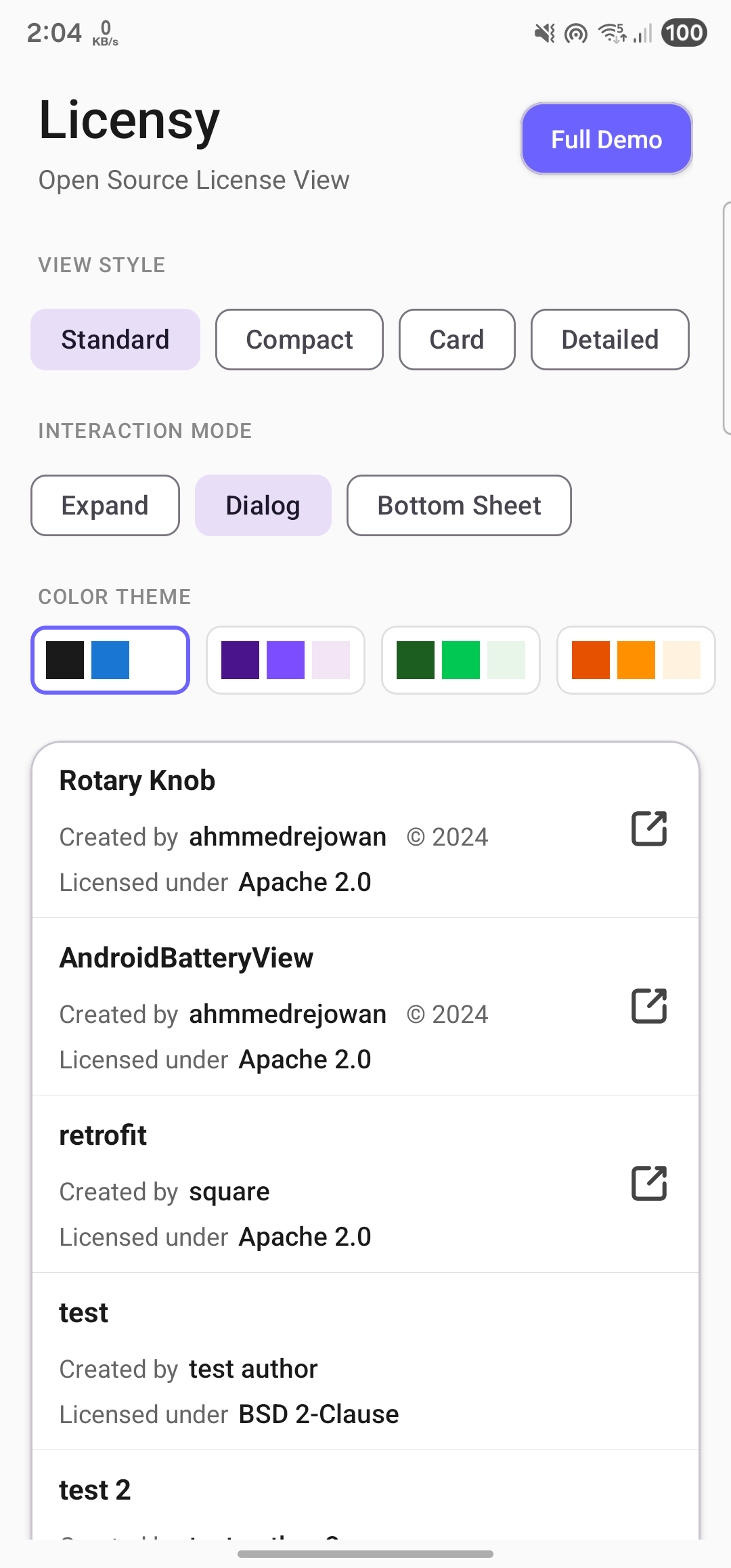
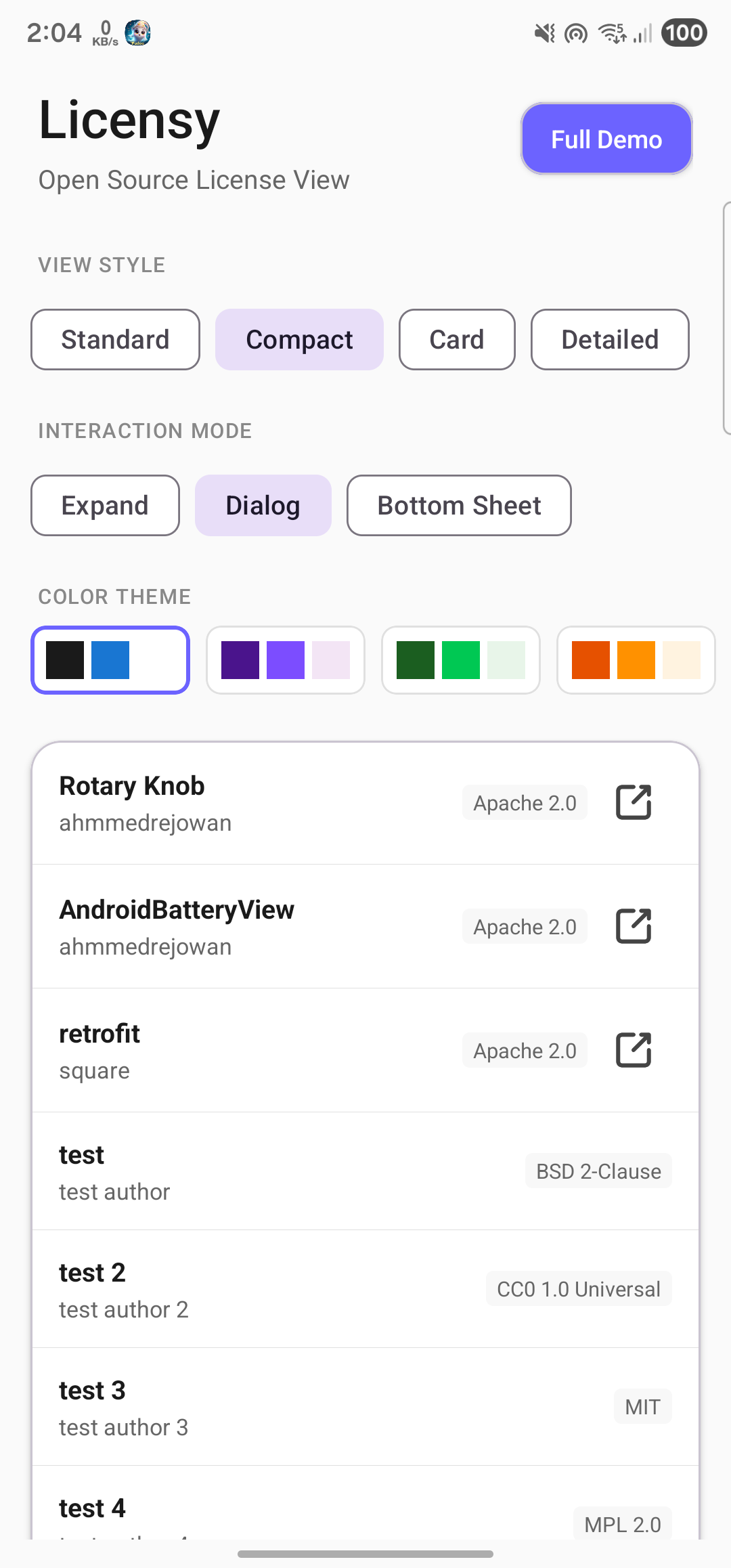
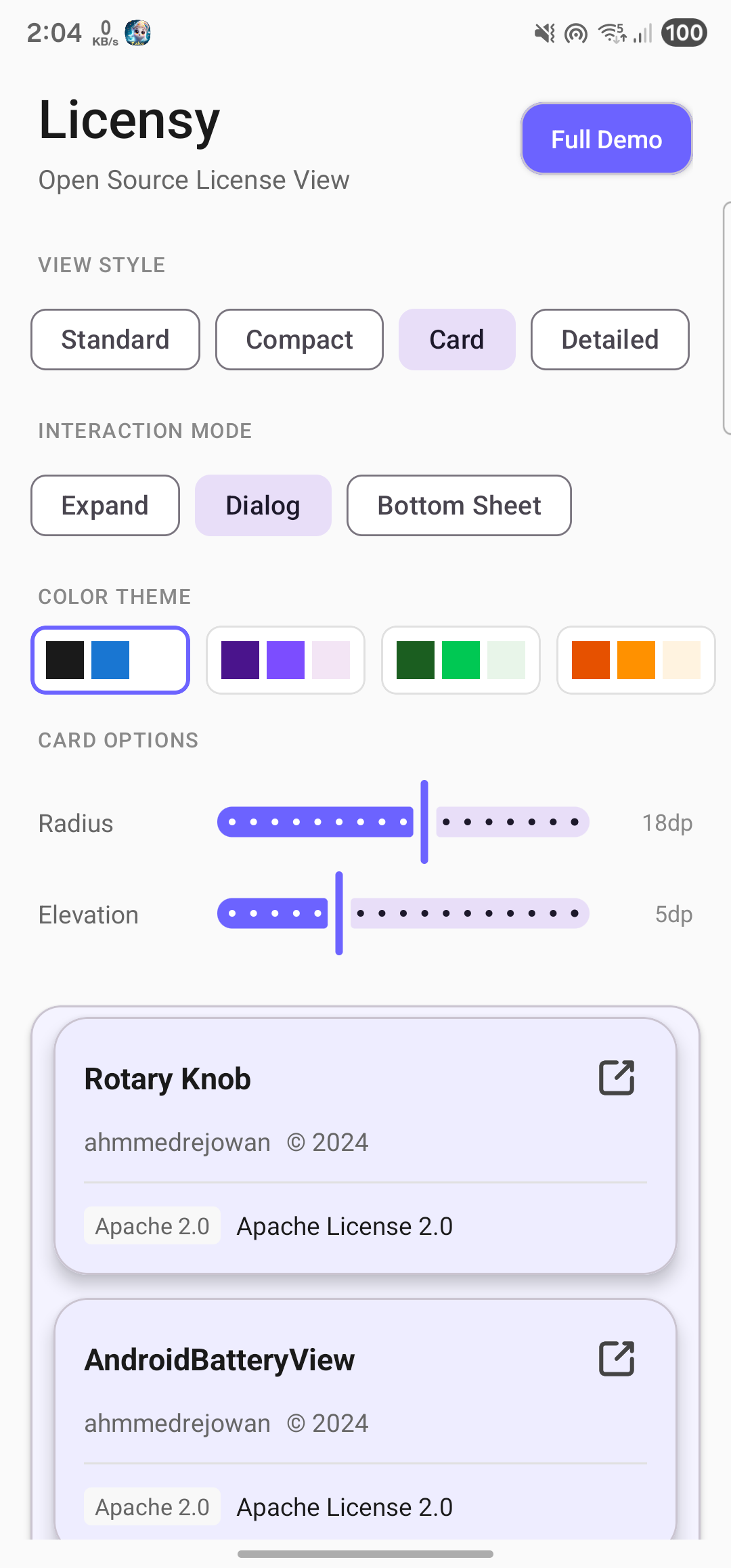
| 4 View Styles | Standard, Compact, Card, and Detailed layouts |
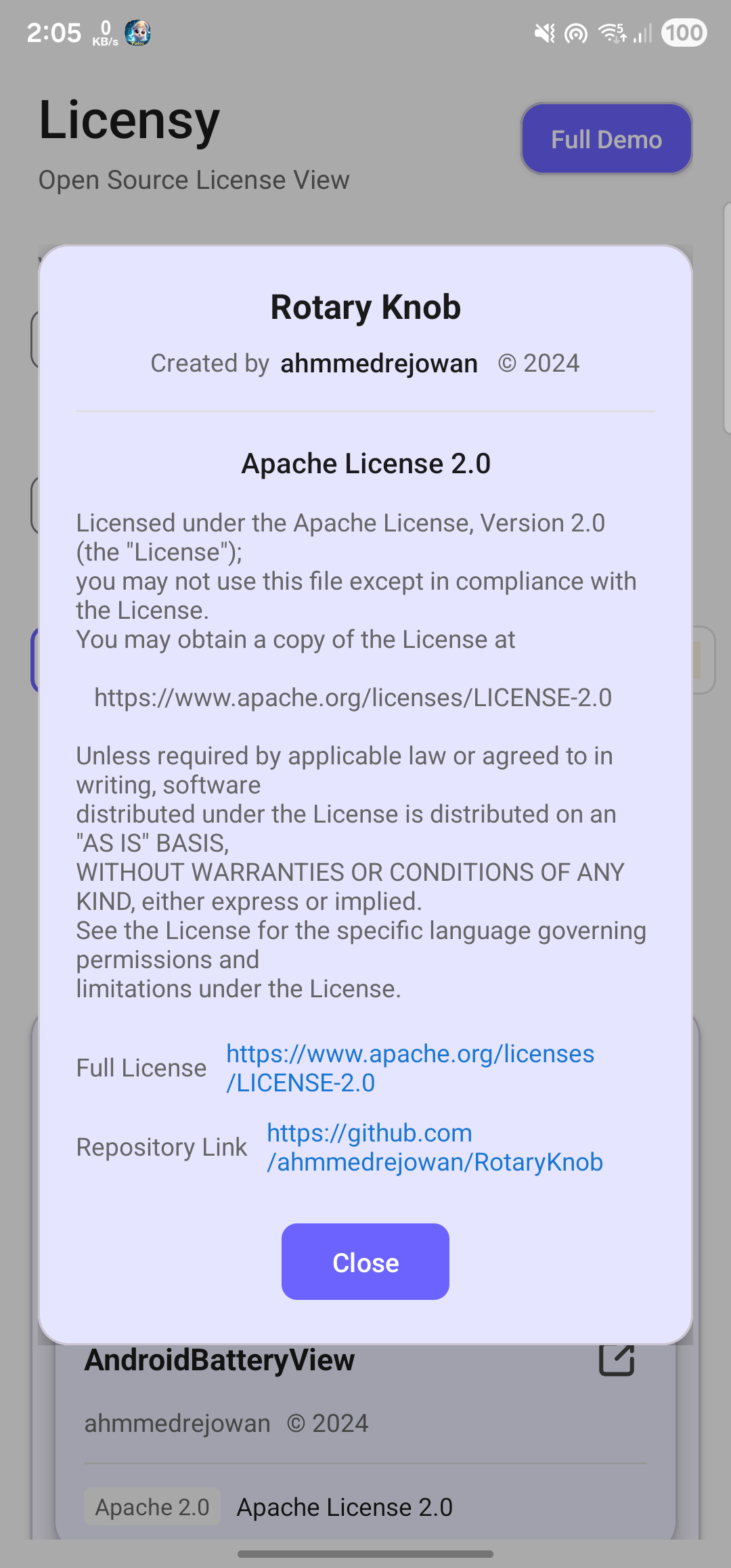
| 3 Interaction Modes | Expand Inline, Dialog, and Bottom Sheet |
| Unified API | Single LicensyView replaces separate Dialog/BottomSheet classes |
| Custom Licenses | Define your own license types |
| Material 3 | Modern styling with ripple effects |
| Maven Central | Official Maven Central distribution |
Features
- Lightweight and performant
- Supports both View system and Jetpack Compose
- 4 visual styles to match your app's design
- 3 interaction modes for different UX needs
- Highly customizable (colors, text sizes, icons, buttons)
- Built-in support for 15+ common licenses
- Support for custom license definitions
- Dark mode compatible
- Works with both Kotlin and Java
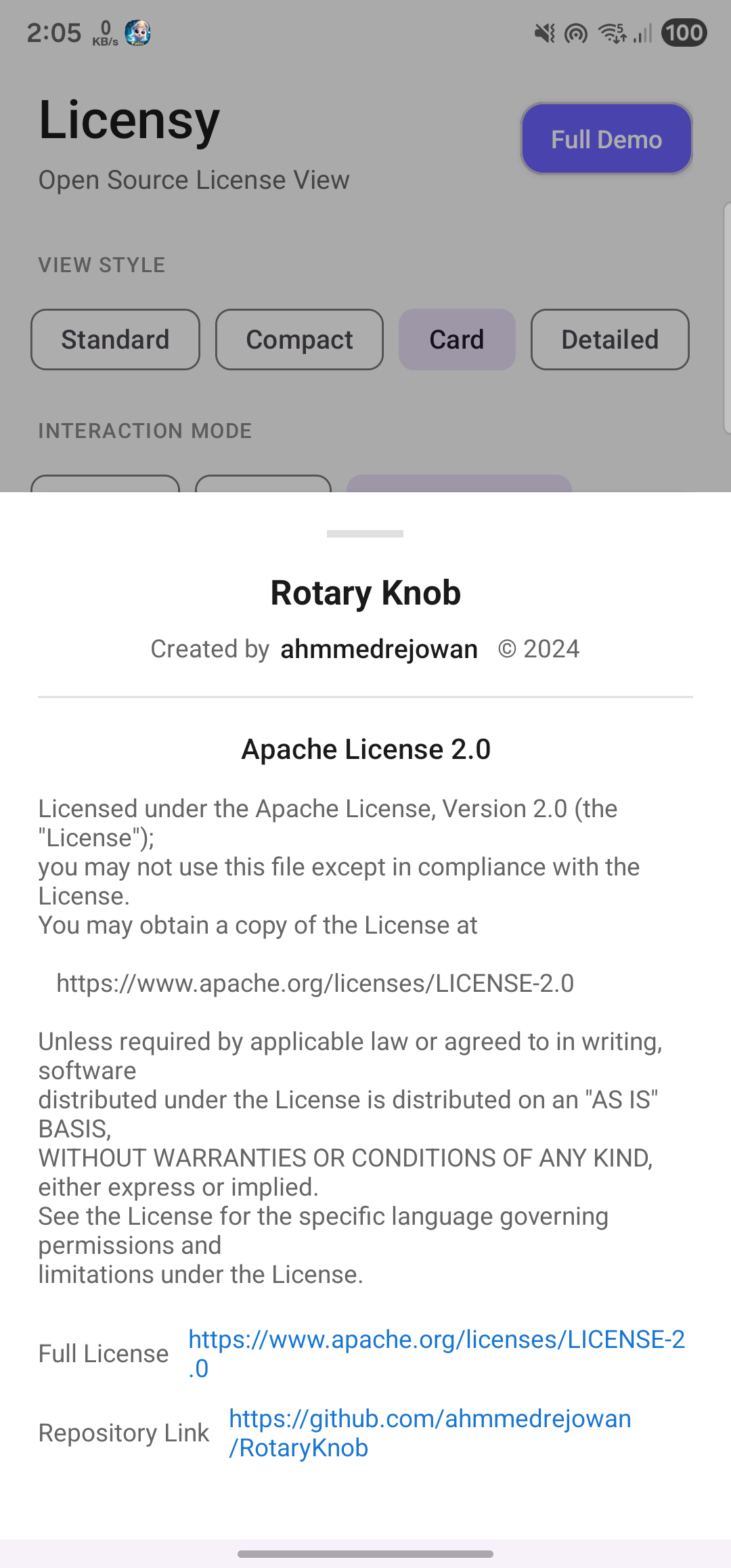
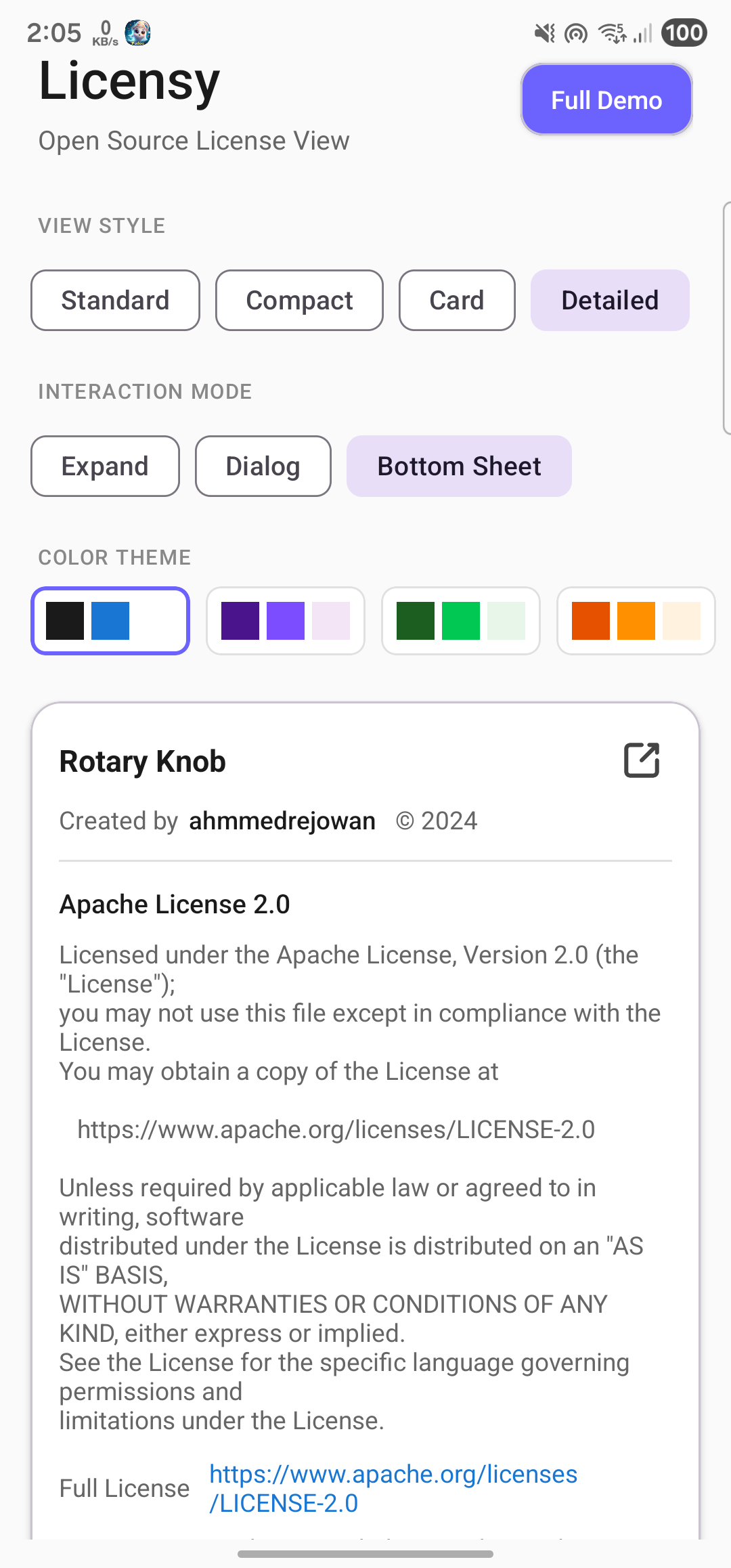
Demo
| Shots | Shots | Shots |
|---|---|---|
 |
 |
 |
 |
 |
 |
Installation
View System (XML)
Add to your module's build.gradle.kts:
dependencies {
implementation("com.rejowan:licensy:1.1.0")
}Jetpack Compose
dependencies {
implementation("com.rejowan:licensy-compose:1.1.0")
}Both (View + Compose)
dependencies {
    implementation("com.rejowan:licensy:1.1.0")
    implementation("com.rejowan:licensy-compose:1.1.0")
}Gradle (Groovy)
dependencies {
    implementation 'com.rejowan:licensy:1.1.0'
    // For Compose
    implementation 'com.rejowan:licensy-compose:1.1.0'
}
Version Catalog
Add to libs.versions.toml:
[versions]
licensy = "1.1.0"

[libraries]
licensy = { group = "com.rejowan", name = "licensy", version.ref = "licensy" }
licensy-compose = { group = "com.rejowan", name = "licensy-compose", version.ref = "licensy" }
Then in build.gradle.kts:
dependencies {
    implementation(libs.licensy)
    // For Compose
    implementation(libs.licensy.compose)
}
JitPack (Legacy v0.x)
For the older 0.x versions, add JitPack repository to settings.gradle.kts:
dependencyResolutionManagement {
    repositories {
        maven { url = uri("https://jitpack.io") }
    }
}
Then add dependency:
implementation("com.github.ahmmedrejowan:Licensy:0.2")Quick Start
1. Add LicensyView to your layout
<com.rejowan.licensy.LicensyView
    android:id="@+id/licensyView"
    android:layout_width="match_parent"
    android:layout_height="match_parent" />
2. Set up licenses in your Activity/Fragment
Kotlin:
val licenses = listOf(
    LicenseContent(
        title = "Retrofit",
        author = "Square, Inc.",
        license = Licenses.APACHE_2_0,
        copyrightYear = "2013",
        url = "https://github.com/square/retrofit"
    ),
    LicenseContent(
        title = "OkHttp",
        author = "Square, Inc.",
        license = Licenses.APACHE_2_0,
        url = "https://github.com/square/okhttp"
    ),
    LicenseContent(
        title = "Gson",
        author = "Google",
        license = Licenses.APACHE_2_0,
        copyrightYear = "2008",
        url = "https://github.com/google/gson"
    )
)

binding.licensyView.setLicenses(licenses)
Java:
List<LicenseContent> licenses = Arrays.asList(
    new LicenseContent(
        "Retrofit",
        "Square, Inc.",
        Licenses.INSTANCE.getAPACHE_2_0(),
        "2013",
        "https://github.com/square/retrofit"
    ),
    new LicenseContent(
        "OkHttp",
        "Square, Inc.",
        Licenses.INSTANCE.getAPACHE_2_0(),
        null,
        "https://github.com/square/okhttp"
    )
);

binding.licensyView.setLicenses(licenses);
Jetpack Compose
Basic Usage
import com.rejowan.licensy.compose.LicensyList
import com.rejowan.licensy.LicenseContent
import com.rejowan.licensy.Licenses

@Composable
fun LicenseScreen() {
    val licenses = listOf(
        LicenseContent(
            title = "Retrofit",
            author = "Square, Inc.",
            license = Licenses.APACHE_2_0,
            copyrightYear = "2013",
            url = "https://github.com/square/retrofit"
        ),
        LicenseContent(
            title = "Coil",
            author = "Coil Contributors",
            license = Licenses.APACHE_2_0,
            url = "https://github.com/coil-kt/coil"
        )
    )

    LicensyList(
        licenses = licenses,
        modifier = Modifier.fillMaxSize()
    )
}
With Customization
import com.rejowan.licensy.compose.LicensyList
import com.rejowan.licensy.compose.LicensyDefaults
import com.rejowan.licensy.LicensyStyle
import com.rejowan.licensy.LicensyInteractionMode

@Composable
fun CustomLicenseScreen() {
    LicensyList(
        licenses = licenses,
        modifier = Modifier.fillMaxSize(),
        style = LicensyStyle.CARD,
        interactionMode = LicensyInteractionMode.BOTTOM_SHEET,
        colors = LicensyDefaults.colors(
            primaryColor = Color(0xFF1A1A1A),
            secondaryColor = Color(0xFF666666),
            linkColor = Color(0xFF1976D2),
            backgroundColor = Color.White
        ),
        onUrlClick = { url ->
            // Handle URL click
        }
    )
}
Compose Parameters
| Parameter | Type | Description |
|---|---|---|
licenses |
List<LicenseContent> |
List of licenses to display |
modifier |
Modifier |
Compose modifier |
style |
LicensyStyle |
Visual style (STANDARD, COMPACT, CARD, DETAILED) |
interactionMode |
LicensyInteractionMode |
How details are shown (EXPAND_INLINE, DIALOG, BOTTOM_SHEET) |
colors |
LicensyColors |
Color configuration |
dimensions |
LicensyDimensions |
Size configuration |
onLicenseClick |
((LicenseContent) -> Unit)? |
Callback when license is clicked |
onUrlClick |
((String) -> Unit)? |
Callback when URL is clicked |
View Styles
Choose from 4 different visual styles:
| Style | Description | Best For |
|---|---|---|
STANDARD |
Expandable list with inline details | Default, feature-rich |
COMPACT |
Single-row with title, author, badge | Long lists, minimal UI |
CARD |
Material CardView with elevation | Modern, card-based designs |
DETAILED |
All info visible, no expansion needed | Full transparency |
Setting Style
Via XML:
<com.rejowan.licensy.LicensyView
    android:id="@+id/licensyView"
    android:layout_width="match_parent"
    android:layout_height="match_parent"
    app:lv_style="card" />
Via Code (Kotlin):
licensyView.style = LicensyStyle.CARD

// For card style, customize corner radius and elevation
licensyView.cardCornerRadius = 16f  // in pixels
licensyView.cardElevation = 8f      // in pixels
Via Code (Java):
licensyView.setStyle(LicensyStyle.CARD);
licensyView.setCardCornerRadius(16f);
licensyView.setCardElevation(8f);
Interaction Modes
Choose how license details are displayed when tapped:
| Mode | Description | Best For |
|---|---|---|
EXPAND_INLINE |
Expands within the list | Quick preview |
DIALOG |
Opens centered dialog | Focused reading |
BOTTOM_SHEET |
Opens bottom sheet | Mobile-friendly |
Setting Interaction Mode
Via XML:
<com.rejowan.licensy.LicensyView
    android:id="@+id/licensyView"
    android:layout_width="match_parent"
    android:layout_height="match_parent"
    app:lv_style="compact"
    app:lv_interaction_mode="bottom_sheet" />
Via Code (Kotlin):
licensyView.interactionMode = LicensyInteractionMode.BOTTOM_SHEETCombining Style + Mode
Any style works with any interaction mode:
licensyView.apply {
    style = LicensyStyle.COMPACT
    interactionMode = LicensyInteractionMode.DIALOG
    setLicenses(licenses)
}
Click Listener
Listen for item clicks (works with all modes):
licensyView.onLicenseClickListener = OnLicenseClickListener { license ->
    Log.d("Licensy", "Clicked: ${license.title}")
}
Customization
Individual Properties
licensyView.apply {
    // Text colors
    lvPrimaryColor = Color.BLACK
    lvSecondaryColor = Color.GRAY
    lvLinkColor = Color.BLUE

    // Background colors
    lvBackgroundColor = Color.WHITE
    lvBackgroundColorExpand = Color.parseColor("#F5F5F5")

    // Other
    lvDividerColor = Color.LTGRAY
    lvTitleTextSize = 18f  // in sp
    imageTint = Color.GRAY
}
Using LicensyCustomization Object
Apply all customizations at once:
val customization = LicensyCustomization(
    lvPrimaryColor = Color.parseColor("#1A1A1A"),
    lvSecondaryColor = Color.parseColor("#666666"),
    lvLinkColor = Color.parseColor("#2196F3"),
    lvTitleTextSize = 16f,
    lvBackgroundColor = Color.WHITE,
    lvBackgroundColorExpand = Color.WHITE,
    lvOpenImage = R.drawable.ic_open_link,
    imageTint = Color.parseColor("#666666"),
    lvDividerColor = Color.parseColor("#E0E0E0"),
    // Button customization (new in 1.1.0)
    lvButtonPrimaryBgColor = Color.parseColor("#1976D2"),
    lvButtonPrimaryTextColor = Color.WHITE,
    lvButtonSecondaryBgColor = Color.parseColor("#F5F5F5"),
    lvButtonSecondaryTextColor = Color.parseColor("#1A1A1A")
)

licensyView.setCustomization(customization)
Dark Mode Example
val darkCustomization = LicensyCustomization(
    lvPrimaryColor = Color.WHITE,
    lvSecondaryColor = Color.parseColor("#B0B0B0"),
    lvLinkColor = Color.parseColor("#64B5F6"),
    lvBackgroundColor = Color.parseColor("#121212"),
    lvBackgroundColorExpand = Color.parseColor("#121212"),
    lvDividerColor = Color.parseColor("#333333"),
    lvButtonPrimaryBgColor = Color.parseColor("#64B5F6"),
    lvButtonSecondaryBgColor = Color.parseColor("#1E1E1E")
)

licensyView.setCustomization(darkCustomization)
Available Licenses
The library includes these pre-defined licenses:
| License | Constant |
|---|---|
| Apache License 2.0 | Licenses.APACHE_2_0 |
| MIT License | Licenses.MIT |
| BSD 3-Clause | Licenses.BSD_3_CLAUSE |
| BSD 2-Clause | Licenses.BSD_2_CLAUSE |
| GNU GPL v3.0 | Licenses.GPL_3_0 |
| GNU GPL v2.0 | Licenses.GPL_2_0 |
| GNU LGPL v3.0 | Licenses.LGPL_3_0 |
| GNU LGPL v2.1 | Licenses.LGPL_2_1 |
| Mozilla Public License 2.0 | Licenses.MPL_2_0 |
| ISC License | Licenses.ISC |
| The Unlicense | Licenses.UNLICENSE |
| WTFPL | Licenses.WTFPL |
| Creative Commons Zero | Licenses.CC0_1_0 |
| Eclipse Public License 2.0 | Licenses.EPL_2_0 |
| GNU AGPL v3.0 | Licenses.AGPL_3_0 |
Custom Licenses
Define your own license types:
val customLicense = License(
    shortName = "Proprietary",
    fullName = "My Company Proprietary License",
    description = "This software is proprietary and confidential.",
    url = "https://mycompany.com/license"
)

val license = LicenseContent(
    title = "Internal Library",
    author = "My Company",
    license = customLicense,
    copyrightYear = "2024"
)
XML Attributes
| Attribute | Format | Description | Default |
|---|---|---|---|
lv_style |
enum | standard, compact, card, detailed |
standard |
lv_interaction_mode |
enum | expand_inline, dialog, bottom_sheet |
expand_inline |
lv_card_corner_radius |
dimension | Corner radius for card style | 12dp |
lv_card_elevation |
dimension | Elevation for card style | 4dp |
lv_text_color_primary |
color | Title and name colors | #1A1A1A |
lv_text_color_secondary |
color | Labels and descriptions | #666666 |
lv_text_color_link |
color | Clickable link color | #1976D2 |
lv_text_size_title |
dimension | Title text size | System default |
lv_background_color |
color | Item background | #FFFFFF |
lv_background_color_expand |
color | Expanded section background | #FFFFFF |
lv_open_image |
reference | Link icon drawable | Built-in icon |
lv_image_tint |
color | Icon tint color | #666666 |
lv_divider_color |
color | Divider line color | #E0E0E0 |
API Reference
LicensyView
| Method | Description |
|---|---|
setLicenses(list) |
Set the list of licenses to display |
getLicenses() |
Get the current list of licenses |
clearLicenses() |
Remove all licenses |
setCustomization(customization) |
Apply a customization object |
LicenseContent
data class LicenseContent(
    val title: String,           // Library name
    val author: String,          // Author/Organization
    val license: License,        // License type
    val copyrightYear: String?,  // Optional year
    val url: String?             // Optional repository URL
)
Migration from 0.x
Breaking Changes
| 0.x | 1.0+ |
|---|---|
LicensyDialog class |
Removed - use interactionMode = DIALOG |
LicensyBottomSheet class |
Removed - use interactionMode = BOTTOM_SHEET |
OnDialogListener interface |
Removed |
| JitPack dependency | Maven Central dependency |
Dependency Change
Before (0.x):
// settings.gradle.kts
maven { url = uri("https://jitpack.io") }

// build.gradle.kts
implementation("com.github.ahmmedrejowan:Licensy:0.2")
After (1.1.0):
// No repository needed - Maven Central is default

// build.gradle.kts
implementation("com.rejowan:licensy:1.1.0")
Code Migration
Before (0.x) - Dialog:
val dialog = LicensyDialog(this)
dialog.setTitle("Open Source Licenses")
dialog.setLicenses(licenses)
dialog.setCustomization(customization)
dialog.show()
After (1.1.0) - Dialog Mode:
// In your layout XML or programmatically add LicensyView
licensyView.apply {
    interactionMode = LicensyInteractionMode.DIALOG
    setCustomization(customization)
    setLicenses(licenses)
}
Before (0.x) - BottomSheet:
val bottomSheet = LicensyBottomSheet(this)
bottomSheet.setLicenses(licenses)
bottomSheet.show()
After (1.1.0) - BottomSheet Mode:
licensyView.apply {
    interactionMode = LicensyInteractionMode.BOTTOM_SHEET
    setLicenses(licenses)
}
New Features to Explore
After migrating, try these new features:
// Try different styles
licensyView.style = LicensyStyle.CARD

// Customize card appearance
licensyView.cardCornerRadius = 16f
licensyView.cardElevation = 8f

// Listen for clicks
licensyView.onLicenseClickListener = OnLicenseClickListener { license ->
    // Handle click
}

// Or use Jetpack Compose!
LicensyList(
    licenses = licenses,
    style = LicensyStyle.CARD,
    interactionMode = LicensyInteractionMode.DIALOG
)
Contribute
Please fork this repository and contribute back using pull requests.
Any contributions, large or small, major features, bug fixes, are welcomed and appreciated.
Let me know which features you want in the future in the Issues tab.
If this project helps you, give it a Star!
License
Copyright 2024 ahmmedrejowan

Licensed under the Apache License, Version 2.0 (the "License");
you may not use this file except in compliance with the License.
You may obtain a copy of the License at

 http://www.apache.org/licenses/LICENSE-2.0

Unless required by applicable law or agreed to in writing, software
distributed under the License is distributed on an "AS IS" BASIS,
WITHOUT WARRANTIES OR CONDITIONS OF ANY KIND, either express or implied.
See the License for the specific language governing permissions and
limitations under the License.- Kotlin
- android
- kotlin
- licensy
Changelog
v1.1.0
latest- Jetpack Compose Support
- Button Color Customization
- Minimal White Theme
- and 2 more
Full notes for v1.1.0
v1.1.0 on GitHub ↗What's New in 1.1.0
New Features
- Jetpack Compose Support - New
licensy-composemodule withLicensyListcomposable - Button Color Customization - Customize primary/secondary button colors in dialogs and bottom sheets
- Minimal White Theme - Default theme now uses clean white backgrounds for a modern look
Improvements
- Improved Dialog/BottomSheet UI - Cleaner, more compact design with action buttons
- Consistent Colors - Uniform background colors throughout dialogs and bottom sheets
Full Changelog
See the README for complete documentation.
v1.0
- 4 View Styles
- 3 Interaction Modes
- Custom Licenses
- and 5 more
Full notes for v1.0
v1.0 on GitHub ↗What's New in 1.0
This is a complete revamp of Licensy with new features and a cleaner API.
New Features
- 4 View Styles: Standard, Compact, Card, and Detailed
- 3 Interaction Modes: Expand Inline, Dialog, and Bottom Sheet
- Custom Licenses: Support for custom license definitions
- Material 3: Updated design with ripple effects and modern styling
- Maven Central: Now published on Maven Central
Usage
kotlinlicensyView.apply { style = LicensyStyle.CARD interactionMode = LicensyInteractionMode.BOTTOM_SHEET setLicenses(licenses) }Breaking Changes
LicensyDialogclass removed - useinteractionMode = DIALOGinsteadLicensyBottomSheetclass removed - useinteractionMode = BOTTOM_SHEETinsteadOnDialogListenerremoved
See the README for full documentation and migration guide.
0.2
- copyrightYear is no String instead of Int
- Fixed issue on Color Change
- Added Title and Close text customization
Full notes for 0.2
0.2 on GitHub ↗License Content
- copyrightYear is no
Stringinstead ofInt
Dialog and BottomSheet
- Fixed issue on Color Change
- Added Title and Close text customization
More libraries
Country Code Picker Compose
libraries / ccpcA Modern Country Code Picker for Jetpack Compose
- RotaryKnob logo
RotaryKnob
libraries / rotary-knobRotary Knob for Android
- AndroidBatteryView logo
AndroidBatteryView
libraries / android-battery-viewAndroid Battery View